Role Mapping in Data Lists
This topic contains the following sections:
Note
Term definition: Standard = non-safety-related
The term "standard" always refers to non-safety-related items/objects. Examples: a standard process data item is only read/written by a non-safety-related I/O device, i.e., a standard device. Standard variables/functions/FBs are non-safety-related data. The term "standard controller" designates the non-safety-related machine controller. |
The following assignments are possible:
- Variables to process data items (I/O terminals of I/O devices in the PLANT).
- Variables of the machine controller to standard variables of the Safety PLC (exchange variables).
These assignments have to be done in the Data List of ...
- the 'PLC' node, or of
- the SafetyPLC node, or of
- the involved I/O device, or of
- a program instance which contains instance-related I/O variables.
Note
Diagnostic system variables
iC9200 Series controllers with an integrated Safety PLC may provide diagnostic system variables, e.g., for monitoring the status of FSoE slaves and the FSoE communication. Such system variables can be assigned to exchange variables in order to inform the standard application about the condition of the functional safety application. |
Refer to the topic "FSoE Communication/Device State Diagnostics" for further information.
Automatic creation of safety-related variables in the Safety PLC
When you connect a safety-related process data item (signal) to a standard PLC variable in a Data List using the Role Picker, iCube Engineer automatically creates a corresponding safety-related variable in the Safety PLC and connects it. The name, safety-related data type (and comment, if available) of the automatically created Safety PLC variable are derived from the standard variable. The data direction of the Safety PLC variable is derived from the process data item type:
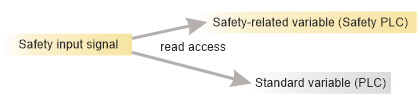
- A safety-related input signal results in a Safety PLC variable with data direction 'I'. As a result, the safety-related process data item can be read in the safety-related code as well as in the standard application.
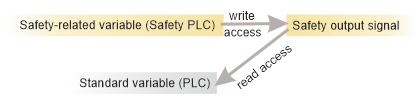
- A safety-related output process data item results in a 'Q' variable in the Safety PLC. As a result, the safety-related process data item can be written in the safety-related code. Writing to a safety output from the standard application is not possible. The standard application, however, can read the value which is written to the safety output by the safety application.
Note
Although this results in an assignment of a Safety PLC variable and a machine controller variable, this is not to be confused with an exchange variable. Exchange variables in the Safety PLC always have a standard data type and no process datum is assigned. In this present threefold assignment, however, the process data item has the leading role. Therefore, the Safety PLC variable has a safety-related data type. |
Rules for reassigning already connected roles (role replacement)
Already defined assignments (that is to say connected roles) can easily be modified by selecting another element in the corresponding field (without disconnecting it first). When replacing an item in the list, this corresponds to disconnecting and reassigning in one step.
The Data List supports the following reassignments:
- A 'Variable (PLC)' can be reassigned to an element of the same type from one of the following columns:
- 'Process Datum'
- 'Variable (Safety PLC)'
- A 'Process Datum' can be reassigned to an element of the same type from one the following columns:
- 'Variable (PLC)'
- 'Variable (Safety PLC)'
- A 'Variable (Safety PLC)' can be reassigned to an element of the same type from one the following columns:
- 'Variable (PLC)'
- 'Process Datum'
What do you want to do?
 How to make a data assignment using the Role Picker
The assignment of variables and process data items (I/O terminals) in a Data List is done by simply selecting an entry in the corresponding columns using the Role Picker as follows:
Note
In Data Lists, Port Lists and variables tables, the selection in drop-down lists is done with a single-click, not with a double-click. |
- In the table, left-click into the field where you want to assign a data item and which is showing the text 'Select ... here' or move the table cursor using the arrow keys or <Tab>/<Shift>+<Tab> to this table field and press <Enter>.
The Role Picker appears. It is divided into a tree on the left and data items on the right. The Role Picker only provides data items for selection which match the data type for the assignment to be done.
- Select a folder in the tree on the left and then the data item on the right by clicking it or pressing the <Enter> key.
Note
The Role Picker retains your last selection as long as the editor has not been closed. |
Use the following keys to navigate in the Role Picker:
| Press the shortcut ... | ... to ... |
| <Tab>/<Shift> + <Tab> | switch between the folders on the left and the entries on the right. |
| <ArrowDown>/<ArrowUp> | move the cursor down/up. |
<Enter>
(focus on the right side) | select the currently marked entry, close the selection control and apply the entry to the table field. |
<ArrowRight>/<ArrowLeft>
(focus on the left side) | expand/collapse the currently marked folder on the left. |
Note
All modifications on the Data List configuration are immediately applied to all other locations (Data Lists) where the corresponding variable/process data item is listed. |
Role assignments can be modified, i.e., the mapping can be replaced without disconnecting an assignment first. Refer to the upper section "Rules for reassigning already connected roles (role replacement)".
Disconnecting variables and process data items
Once an assignment between two roles has been made, the toolbar and context menu provide commands to unassign, i.e., to disconnect them. Depending on the assignment, the following disconnect commands are available:
The following applies:
- A command is applied to the selected table row. (Multiselection is possible.)
- By disconnecting variables, they are not deleted.
 | Disconnect variable of the machine controller from variable of the Safety PLC. The command is available in the Data List of the machine controller for variables which are connected to a variable of the Safety PLC. The table row may contain an exchange variable (no process data item involved) or a threefold mapping between machine controller variable and Safety PLC variable and process datum. Alternatively, right-click the table line and select the appropriate 'Disconnect Variable PLC' command.
|
 | Disconnect process datum from variable. The command is available for variables of the machine controller and of the Safety PLC which are assigned to a process data item.Alternatively, right-click the table line and select the appropriate 'Disconnect Process Datum' command.
|
 | Disconnect variable of the Safety PLC from variable of the machine controller. The command is available in the Data List of the Safety PLC for variables which are connected to a machine controller variable. The table row may contain an exchange variable (no process data item involved) or a threefold mapping between machine controller variable and Safety PLC variable and process datum.Alternatively, right-click the table line and select the appropriate 'Disconnect Variable Safety PLC' command.
|
 | Disconnect all roles from each other (in all selected table rows).The command is available in all Data Lists for variables which are connected to at least one other role. It is also useable for multiple mappings (e.g., threefold mapping between machine controller variable and Safety PLC variable and process datum).Alternatively, right-click the table line and select the appropriate 'Disconnect Variable Safety PLC' command.
|

 | Variables that are no longer needed in a Data List can be removed via the command 'Remove all unused global Variables'. This command is separately available for variables of the machine controller and the Safety PLC. |
Note
All modifications on the Data List configuration are immediately applied to all other locations (Data Lists) where the corresponding variable/process data item is listed. |
Manual confirmation of modified safety-related I/O variable
The Data List of the Safety PLC provides a 'Confirm' flag for each safety-related variable. This flag is active and must be selected under the following circumstances:
- Each time, you assign a process data item to a safety-related variable thus defining a safety-related input or output variable.
- Each time a process data item which is assigned to a safety-related variable was modified in the PLANT.
Unintended equipment operation
- Inspect and correct as necessary any global I/O variables related to physical, safety-related I/Os whenever you modify the PLANT structure.
- Whenever you add, delete or exchange devices in the PLANT, validate the physical wiring of your safety-related architecture and thoroughly test the application.
|
- Double-click the Safety PLC icon in the PLANT and open its Data List in the editors area.
- Select the checkbox to confirm the assigned/modified process data item.
The 'Confirm' flag is automatically deselected after replacing a safety-related module. In this case, you must repeat the I/O verification and set 'Confirm' again for the affected variables. Observe the hazard message and information given in the topic "Replacing Devices", section "Safety requirements when replacing the Safety PLC...".