Exchanging Data between Controller and Safety PLC
If a Safety PLC is included in your project, communication between the standard (non-safety-related) machine controller and the Safety PLC is possible and allows the coupling of the standard application with the safety-related application.
Communication possibilities between machine controller and Safety PLC:
| Note
To edit safety-related data you have to be logged on to the Safety-related Area: Left-click the  area in the status bar, enter your password and press <Enter>. area in the status bar, enter your password and press <Enter>. |
Exchange variables
In Data Lists, global machine controller variables can be mapped to global standard Safety PLC variables.
For the Safety PLC variable (i.e., in the Safety PLC Data List), a data direction has to be set which determines whether data is transferred from or to the Safety PLC: 'I' means that the variable can be read by the safety-related application and 'Q' that it can be written by the safety-related application. Accordingly, the standard application has write or read access.
Exchange variables are always standard variables: only a non-safety-related variable declared with 'Global' keyword in the Data List of the Safety PLC can be assigned to a 'Global' variable of the standard machine controller. No process datum (input or output signal from the process) is involved.
Do not confuse exchange variables with the threefold assignment of a process data item and a Safety PLC variable and a machine controller variable. In such cases, the process data item has the leading role and the Safety PLC variable has a safety-related data type. (Refer to section "Reading safety-related signals in the standard machine controller" for details.)
- Use case 1: When programming the Enable Principle by means of the EN_OUT function in the safety-related project, exchange variables can be mapped to the data of the standard controller.
- Use case 2: the Safety PLC integrated in iC9200 Series controllers may provide diagnostic system variables, e.g., for monitoring the status of FSoE Devices and the FSoE communication. Such system variables can be assigned to exchange variables in order to inform the standard application about the condition of the functional safety application.
There are two possibilities to create exchange variables:
- Assign an existing variable of the machine controller to an existing standard variable of the Safety PLC using the Role Picker.
Refer to the topic "Role Mapping in Data Lists: I/O Variables and Exchange Variables" for details. - Create a new variable in one of the Data Lists as described below.
What do you want to do?
 How to create a new exchange variable

How to disconnect an exchange variable


How to delete an exchange variable

Reading safety-related signals in the standard machine controller
The standard machine controller can read the status of safety-related signals. This applies to safety-related input signals and output signals:
- Reading a safety-related input signal in the standard application:
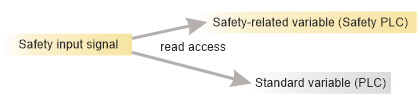
- Reading a safety-related output signal in the standard application:
Note
Writing to a safety output from the standard application is not possible. The standard application, however, can read the value which is written to the safety output by the safety application.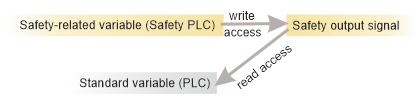
| Note
Although this is an assignment of a Safety PLC variable to a machine controller variable, do not confuse it with an exchange variable. Exchange variables in the Safety PLC always have a standard data type and no process datum is assigned. In this present threefold assignment, however, the process data item has the leading role. Therefore, the Safety PLC variable has a safety-related data type. |
How to read a safety-related input/output in the standard machine controller

Processing standard signals of the safety application in the standard machine controller
The standard machine controller can process standard signals which belong to the safety application.
- Reading a standard input signal of the safety application in the standard application.
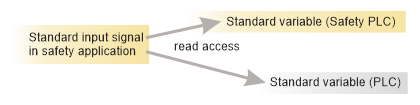
- Writing a standard output signal of the safety application from the standard application.
Note
In this case, the Safety PLC has read-only access (Safety PLC variable with standard data type has data direction: 'I') and the signal is written by the standard machine controller.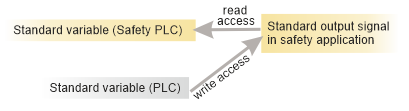
The necessary assignments can be done in the Data List of the machine controller or the Safety PLC using the Role Picker. Please refer to the previous section for details.