Replacing Devices in the PLANT
This topic contains the following sections:
- Notes on the replacement of safety devices by an updated version
- Safety requirements when replacing the Safety PLC or safety input/output modules
- How to replace a device
You can replace a single device (controller, device, module, submodule etc.) that is contained in the PLANT by another device type. This allows you, for example, to replace a controller by another controller type while retaining all of the settings, the network configuration (network devices), task configuration, etc. as far as possible.
When replacing a device, iCube Engineer tries to retain as much data as possible (settings, topology connections, variable connections, data lists connections, etc.) and use it with the new device. Which data can be retained for a replacement device depends on whether the data remains valid and is still suitable with the new device. When you replace, for example, a controller by a newer version of the same controller type, the maximum amount of data is retained.
On replacement of a device, observe the following:
- If safety-related devices are affected by the replacement, you must observe the described safety requirements.
- When replacing safety-related devices by an updated version, take the notes below into consideration.
- Devices can only be replaced by devices of the same type (controller by controller, Profinet device by Profinet device, etc.).
- Devices cannot be replaced by devices of the same type and same version (i.e., which have the same type name as indicated in the COMPONENTS area).
- A non-safety-related controller can be replaced by a safety-related controller. Replacing a safety-related controller by a non-safety-related controller is not possible.
- A controller can only be replaced by another controller when no devices are lost.
If, for example, the controller to be replaced contains SliceBus modules and the replacement controller does not support SliceBus, replacement is not possible. A corresponding message is generated in the Project log. To replace the controller, you first have to delete the unsupported devices in the PLANT configuration and then repeat the replacement operation.
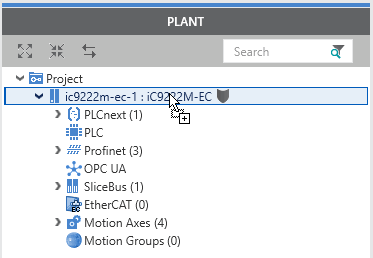
- iCube Engineer checks whether the replacement of a device in the PLANT is allowed. For instance, when you try to replace a device by an invalid device via drag and drop from the COMPONENTS area (see description below), the "not allowed" cursor indicates the inadmissible operation.
- Information on the replacement procedure is recorded in the Project Log in the MESSAGES window. Discarded replacement operations, such as discarded connections between variables and process data items in the device's data list or discarded tasks and events settings are indicated by a corresponding message.
The following table describes, on which devices in the PLANT the Replace function can be applied and which data is retained if valid and suitable for the replacement device.
| Device | Transferred data |
|---|---|
| Controller |
|
| Profinet devices, modules, and submodules |
|
| SliceBus modules |
|
| EtherCAT slaves |
|
Notes on the replacement of safety devices by an updated version
A device type in iCube Engineer may be updated by a newer version by adding, for example, a new library (version) or by updating the iCube Engineer software, or by importing a new version of the corresponding device description (FDCML) file.
When replacing a safety-related device in the PLANT by an updated version as described below, iCube Engineer tries to adapt the parameter model of the device instance to the new device description.Whenever possible, the parameter values set before the update are adopted for the device instance so that no editing of the parameterization is necessary after the update.
However, if it is not possible to take over the settings due to newly added or changed parameters, the following scenarios are possible:
- If a parameter has been added with an ID that was not used before, this parameter will be initialized with its default value. Set the parameter to the required value.
- If a parameter has been deleted, it is removed from the parameterization. No actions are required.
- If a parameter has been modified but its definition differs from the previous device version, the behavior depends on type-specific properties. The following is possible:
- Modifications of the parameter name, description or unit are taken over. In this case, no action is required.
- Modified parameters are initialized with their default values and they are shown read-only in the parameterization editor. Set the parameters accordingly and confirm them.
- An error occurs. Either the device replacement is rejected, or the replacement is done but an error message is reported and an entry into the SafetyLog (and in the migration report - see below) is made. In this case, the safety-related parameter editor can only be opened after confirming the message. Inspect the affected parameter and take the measures required.
If an invisible safety-related parameter causes the error, i.e., if you have no possibility to correct the parameter value, a safety violation is reported. Inspect the SafetyLog which parameter is affected.
In each case, iCube Engineer logs each modification in the parameterization which result from the update of the device instance in a migration report. The log file (*.log) is written into the log directory of iCube Engineer:
%PUBLIC_DOCUMENTS%\iCube Engineer\Logs
Its file name starts with SafetyDeviceReplace supplemented by date and time of creation.
Safety requirements when replacing the Safety PLC or safety input/output modules
When replacing a controller that includes a Safety PLC or other safety-related devices, the I/O mapping of safety-related global variables may change. This may be due to the fact that addresses change or process data items of the Safety PLC are no longer available after the replacement. If the replacement is done after the I/O check has already been performed, such I/O changes could go undetected.
To help detect I/O modifications after a Safety PLC/safety device replacement, note down the Global Variables checksum before the replacement and manually compare it with the calculated value after the replacement. The Global Variables checksum is displayed in the 'Safety Information' editor. Double-click the 'Project' node in the PLANT to open this editor.
|
WARNING
|
Non-conformance to safety requirements
|
After replacing safety-related input or output modules, physical addresses may be changed. You must revalidate the I/O mapping (assignment of safety-related variables to safety inputs/outputs).
|
WARNING
|
Unintended machine operation
|
How to replace a device
You have several possibilities to replace a device with iCube Engineer:
 Replacement via the device's context menu in the PLANT
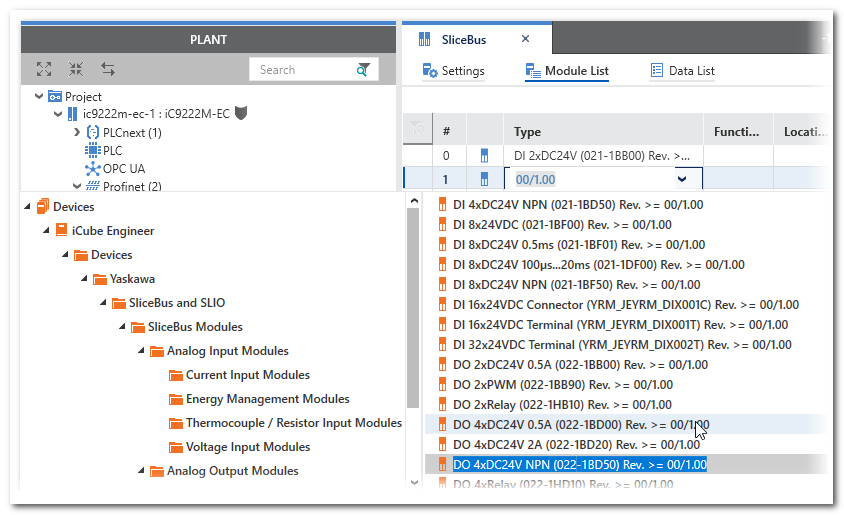
Replacement via Drag & Drop from the COMPONENTS area into the PLANT