'Module List' Editor (SliceBus Controller)
The following information refers to a specific, typical device type. Your screen may differ.
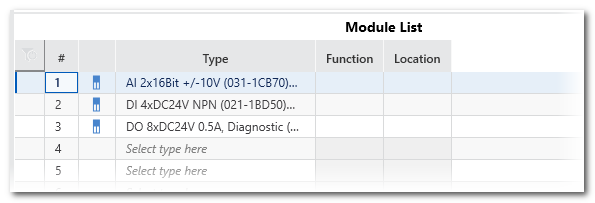
This help topic describes the 'Module List' editor of the 'SliceBus' PLANT node (which represents the SliceBus Controller). The 'Module List' is also referred to as station editor. This tabular editor contains SliceBus modules which have been added under the 'SliceBus' node.
You can add SliceBus modules here by clicking on an empty row into the 'Name' field and selecting a device using the role picker.
| Column | Description |
|---|---|
| # | Number of the SliceBus modules connected to the local bus. The number of lines (i.e., connectable modules) in the table depends on the controller type (that is to say, on the number of connectable SliceBus modules the controller supports). This number is specified in the 'Settings' editor (section 'General') of the 'SliceBus' node. |
| Type | Type of the already inserted SliceBus module.To add a further module, left-click into a field showing the text 'Select type here' or move the table cursor using the arrow keys to this table field and press <Enter>. The Role Picker appears for selecting modules. |
| Function | Function description. The parameter is still available after a firmware update.The 'Function' text is shown in the module node name (preceding the type) in the PLANT.Max. string length: 32 characters |
| Location | Installation location of the module. The parameter still available after a firmware update.If no 'Function' is specified, the 'Location' text is visible in the tree.Max. string length: 32 characters |
| Further Info
Refer to the topic "Inserting Devices/Modules in the Station Editor" for more details and procedures how to work with the station editor. |