- Home
- User Interface - Reference
- PLANT Area
- Project Sub-nodes
- Controller Sub-nodes
- PLCnext Node
- 'Data Logger Session' Editor (PLCnext)
'Data Logger Session' Editor (PLCnext)
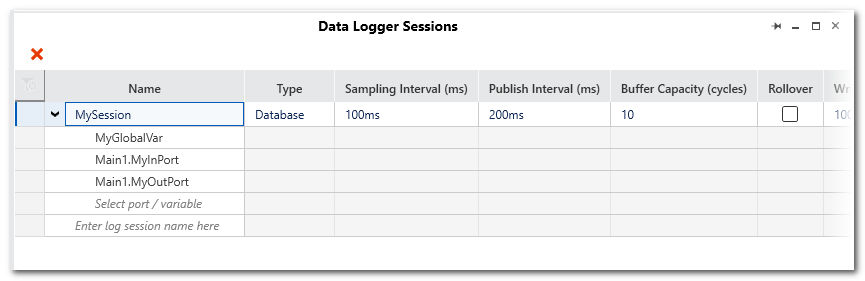
This help topic describes the 'Data Logger Sessions' editor of the 'PLCnext' PLANT node. The editor enables the configuration of the Data Logger service tool.
The Data Logger is a service component of the iC9200 Series firmware. It can record data from any PLCnext IN or OUT ports as well as global IEC 61131-3 variables of elementary data types. Recorded values are transferred from the GDS to a data sink for recording and storage purposes. The storage of the recorded data is done on the controller. The database is either written to the SD card or kept non-remanent in the controller RAM.
The Data Logger is started and stopped automatically on starting and stopping the firmware, i.e., the iC9200 Series controller.
You can define several Data Logger sessions, each identified by a unique name.
| Further Info
The steps how to configure and use the Data Logger are described in the topic "Data Logger Configuration". |
This topic contains the following sections:
Toolbar of the editor
| Toolbar button | Description |
|---|---|
 | Deletes the selected entries. Multi selection is possible. |
Columns in the Data Logger Sessions editor
For each Data Logger session, the following configuration parameters must be set in the 'Data Logger Sessions' editor. No parameter may remain undefined.
 Click here to see the description of the Data Logger Sessions columns
| Parameter | Meaning | ||
|---|---|---|---|
| Name | Identifies the Data Logger session. The name must be unique within the project. The name must consist of normal letters and the characters "-", ".", and "+". Other special characters are not allowed. |
||
| Type | Defines the name of the data sink where the recorded data is stored. For each configured Data Logger session, one data sink is created.Possible values are:
|
||
| Sampling Interval (ms) | Defines the interval in which the Data Logger subscribes values. A value of 0 means that the task cycle time is used as interval time.The value must be in the following range (enter the value with the corresponding unit, e.g. 10ns): ns: 0 up to 9223372036854775807 µs: 0 up to 9223372036854775807 ms: 0 up to 9223372036854775 s: 0 up to 9223372036854 m: 0 up to 153722867280 h: 0 up to 2562047788Default value: 100ms |
||
| Publish Interval (ms) | Defines the interval in which the data is transferred from the data buffer to the data sink. Note that the data publishing is not
performed within the real-time context. See next table row for further information.The value must be in the following range (enter the value with the corresponding unit, e.g. 10ns): ns: 1000 up to 9223372036854775807 µs: 1 up to 9223372036854775807 ms: 1 up to 9223372036854775 s: 1 up to 9223372036854 m: 1 up to 153722867280 h: 1 up to 2562047788Default value: 200ms |
||
| Buffer Capacity (cycles) | Determines the size of the data buffer (in no. of cycles) where the recorded values are cached before they are forwarded to the specified data sink. Value range: 0 up to 65535 Default value: 10Background: In each cycle, the values of all recorded data items of a task are stored temporarily in this ring buffer. The capacity of the ring buffer determines the maximum number of task cycles that can be recorded before the data must be transferred from the buffer to the data sink. The transfer from the buffer to the data sink is referred to as publishing. |
||
| Rollover | Defines the handling of data sink files.
|
||
| Write Interval | Specifies how many data
records are published to the data sink before these values are written to the file on the SD
card.The parameter is only relevant if 'Type' is set to 'Database'. Before closing the database or when the machine controller is switched off, all recorded values
that have not yet been transferred are written to the SD card.
|
||
| Max File Size | Defines the maximum memory size of the log file in bytes. Value range: 16384 up to 150000000 bytes Default value: 5000000
|
||
| Max Files | Defines the maximum number of rolling files.
The value is only relevant, if the 'Rollover' checkbox is activated. When the maximum number of files is
reached, the oldest file will be deleted. The file index of the closed files will be counted
up further.
Possible values: Value range: -1 up to 4294967295 Default value: -1.
|
||
| Store Changes | Defines the recording mode.
|
||
| Delete Ratio (%) | Defines the percentage amount of the maximum memory size to be deleted for the logging of new data before new data is written into
the database. The old data is deleted when the value that is defined via the Max File Size parameter is reached and the 'Rollover' checkbox is not activated. Value range: 1 to 100 (integer value) Default value: 30 |
||
| Timestamp Format | Possible values:
The timestamp is created in the task cycle based on the system time of the controller. It is set at the start of the task (task executing event) and maps exactly the cycle time of the task. As a result, the timestamp value of the following task cycle is increased by one cycle duration. The time resolution has a precision of 100 ns.Despite the format, all timestamps are reported using the UTC timezone. The implementation and internal representation complies to the .NET DateTime class, see Documentation of DateTime Struct on https://docs.microsoft.com. |
||
| Trigger Condition | Defines whether the value sampling is done in the context of a selected task or not.
|
||
| Task Context | The field is only active if the checkbox 'Trigger Condition' is marked.Select the task in which sampling is to be performed from a drop-down list. The drop-down list offers all task types for selection. The task defines the update rate of the recorded values. Values are subscribed after each cycle of the selected task. The properties of the set task influence the Data Logger session because the subscription rate depends on the cycle time of the synchronization task. If an 'Idle Task' is selected, the visualized values may be inexact or outdated since the cycle time of the 'Idle Task' may vary (depending on the other user tasks on the controller). An 'Event Task' may be executed not cyclically depending on the defined event. |
||
| Pre Cycles | The field is only active if the checkbox 'Trigger Condition' is marked.Specifies the number of sampling cycles recorded before the trigger event (default value = 10 ms). As soon as the trigger event has occurred, the data recorded during the "pre-trigger cycles" are stored. | ||
| Post Cycles | The field is only active if the checkbox 'Trigger Condition' is marked.Specifies the number of sampling cycles recorded after the trigger event (default value = 10 ms). As soon as the trigger event has occurred, the data recorded is continued during the number of defined "post-trigger cycles". If this number has been reached, the session is stopped automatically. | ||
| Operand 1 and Operand 2 | The fields are only active if the checkbox 'Trigger Condition' is marked.Variable or port used as trigger condition.Depending on the set operation, one or two operands have to be defined.Open the drop-down list which offers only data items of a suitable data type according to the 'Operation' selected. To define a constant as operand, enter a numeric value, or a Boolean value (FALSE or TRUE). | ||
| Operation | The field is only active if the checkbox 'Trigger Condition' is marked.Select an 'Operation' from the drop-down list. Depending on the set operation, one or two 'Operands' have to be defined. |

