CROSS REFERENCES Window
The CROSS REFERENCES window, located in the Cross Function Area at the lower screen border, lists all cross references in your project. For example, the use and declaration of all variable types (including user-defined STRUCTs), instance declaration and call of function blocks, jump labels, SFC elements (transition/action/step names) are listed and much more. Connectors are not listed.
 | You can hide/show the window by clicking the button shown left on the Cross Function Area toolbar. For closing the window, you can also click the cross icon on the right of the window title bar: 
 How to pin/unpin the window in the Cross Function Area How to pin/unpin the window in the Cross Function Area  How to undock/dock the window
  / /
|

Collecting the cross references can be done in the following ways:
- Manually by clicking the 'Collect' icon shown below.
- Automatically after initially compiling or opening a project. To enable the automatic collection of the cross references, the 'Collect cross references after initial project compilation' checkbox in the 'Options' dialog under the 'Cross References | Settings' category must be activated.
This topic contains the following sections:
- Toolbar
- Showing cross references out of the code or variables table/Data List
- Jumping to a function block call from the instance tree ('PLCnext' node)
- Filtering/Sorting the cross references
Toolbar
  | Indicates the status of the collected cross references. The green symbol means that the cross references are up-to-date. After modifying the project (e.g., by creating a POU or editing any worksheet), the warning symbol indicates to possibly outdated cross references. Click the 'Collect' icon to update the list (see next table row). |
 | Collects the cross references from all worksheets and editors. You can sort and filter the list. |
 | Clears the list and removes all entries. |
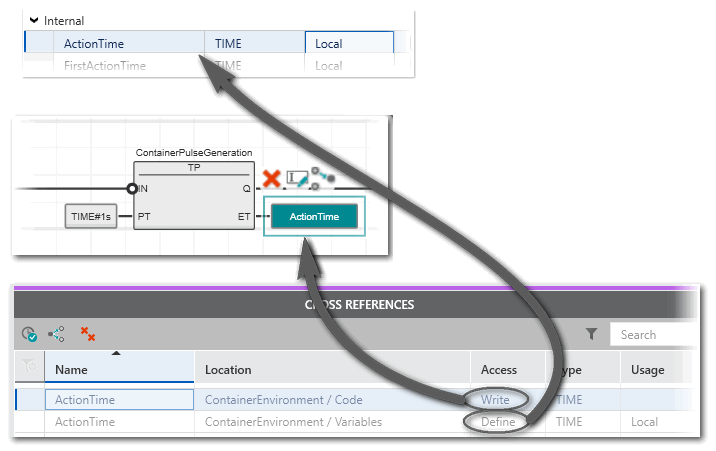
Having collected the cross references, double-clicking a table entry directly jumps into the corresponding editor or data list.
When selecting an entry in the cross references, the context menu 'Refactoring' is available.
Example: Double-click to jump into code or variable table.
Showing cross references out of the code or variables table/Data List
The cross references of a variable/FB instance variable can also be displayed and reached via its context menu- in code worksheets
- in variables tables
- in Data Lists
The following commands are available in the context menu at each of these locations:
| Note
These commands are only active in the context menu, if the list of cross references is collected and up-to-date (  icon is shown in the CROSS REFERENCES window). If the commands are inactive, collect the cross references by clicking the following symbol on the CROSS REFERENCES toolbar: icon is shown in the CROSS REFERENCES window). If the commands are inactive, collect the cross references by clicking the following symbol on the CROSS REFERENCES toolbar: |
| Context menu item | Shortcut | Meaning |
|---|---|---|
| Cross References | - | Shows all references of the current object except the currently selected occurrence. Selecting a submenu entry directly jumps into the corresponding editor or data list ("jump-to functionality" like in the CROSS REFERENCES window). |
 Locate in Cross References Locate in Cross References | <Ctrl>+<,> | Opens the CROSS REFERENCES window and marks the respective entry for this variable. |
 Show all References Show all References | - | Like 'Locate in Cross References' (prev. table row), this command opens the CROSS REFERENCES window and marks the respective entry for this variable. In addition, the cross reference list is automatically filtered for occurrences with the same 'Name', 'Type' and 'Kind'. For local variables, the POU name is used as filter criterion too.For arrays, only members with the same index are shown. Accordingly, for structures only members with the same name are shown.If filters are already set when executing the command, they are cleared. You can then set 'Access' and 'Kind' filters again to apply them in combination with the automatically set filters. Selecting a new text filter, however, clears the automatically set filter criterions.By clicking the delete icon  on the right of the 'Search' input field, the filters are reset. on the right of the 'Search' input field, the filters are reset. |
Jumping to a function block call from the instance tree ('PLCnext' node)
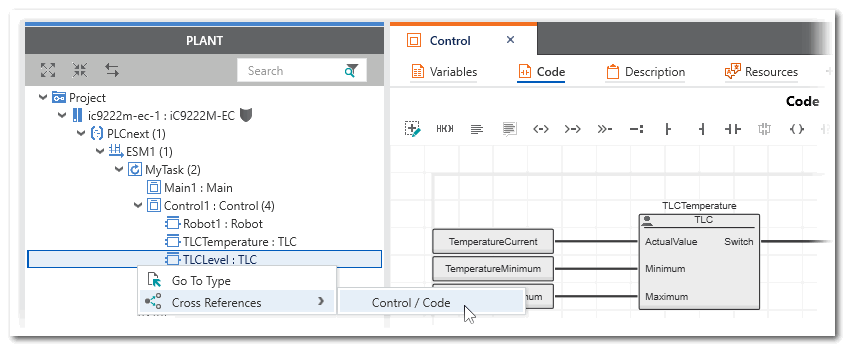
If the cross references are up-to-date (see the following note), you can directly jump to the call of a function block in the code worksheet from the instance tree under the 'PLCnext' node. The submenu of the 'Cross References' context menu command of an FB instance contains the code worksheet where the FB instance is used.
| Note
The command is only active in the context menu, if the list of cross references is collected and up-to-date ( icon is shown in the CROSS REFERENCES window). If the command is inactive, collect the cross references by clicking the following symbol on the CROSS REFERENCES toolbar: |
Filtering/Sorting the cross references
Filter the cross references list



| Note
When executing 'Show all References' from the context menu of a variable, the filter rules apply as described in the table above. |