'Init Command' Editor (EtherCAT Slave Device)
The following information refers to a specific, typical device type. Your screen may differ.
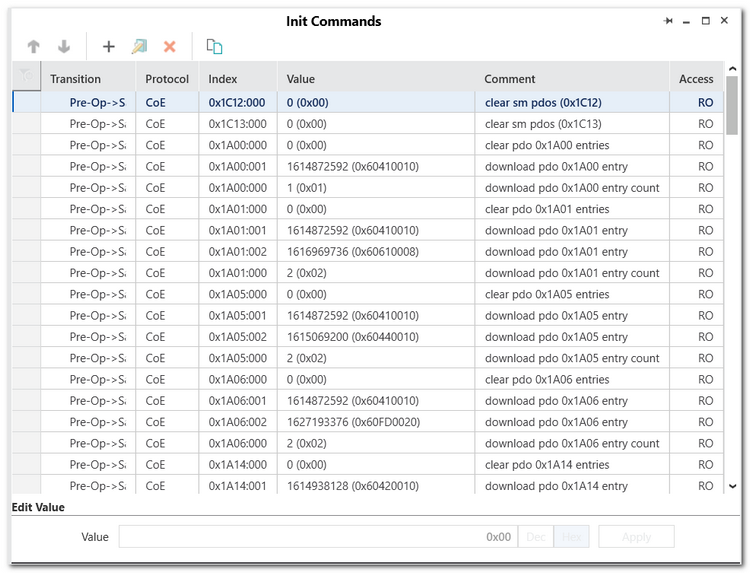
This help topic describes the 'Init Command' editor of an EtherCAT slave device in the PLANT. EtherCAT slave devices are child elements of the 'EtherCAT' node (which represents the EtherCAT Master). Init commands are automatically loaded from the EtherCAT slave information (ESI) file of a slave. Init commands from ESI files can neither be modified nor deleted. In addition, init commands are automatically generated on write access to CoE objects if the written value does not correspond to the default value of the object (refer to the example below).
The Init commands are grouped according to the EtherCAT state transitions. The commands are executed in the order they are listed in the 'Init commands' editor.
| Init command property (column) | Description |
|---|---|
| Transition | Specifies the transition between two EtherCAT states, when the command is executed. |
| Protocol | EtherCAT protocol on which the command is based. |
| Index | Index (main:subindex) of the CoE entry (object) which the command accesses. |
| Value | Value of the init command.If a value is editable (indicated by its 'Access' type), you can modify it as follows:
|
| Comment | Short description of the command. |
| Access | Specifies which access the command may perform. You either have full-access (RW = Read/Write) or only read access (RO = Read-only). |