Slave Configuration: 'PDO Data' editor - selective PDO mapping
With the most field bus systems, the entire process data image is transferred between bus master and slaves (e.g., drives, servos or a field bus coupler with connected I/O modules). EtherCAT provides the possibility of configuring the process data to be used. This is called selective process data mapping.
For that purpose, the available process data items of a slave are organized in so called Process Data Objects (PDO).
The process data that is used in process data communications is defined in the PDO mappings. PDO mappings are definitions of the applications objects that are sent with PDOs.
In iCube Engineer, the PDO mapping is implemented in the 'PDO Data' editor. This editor is available for each EtherCAT slave device in your PLANT and provides access to the PDOs according to the CAN-over-EtherCAT protocol which is defined for the particular slave.
Each PDO of a slave has an index for identification within the slave's PDO list. Each process data item contained in a PDO has another index value which corresponds to the index range of the CoE Object Dictionary.
You can edit the PDO list by selecting/deselecting the 'Active' checkbox of particular items. (Some basic and required PDOs, however, are activated by default and cannot be deactivated.)
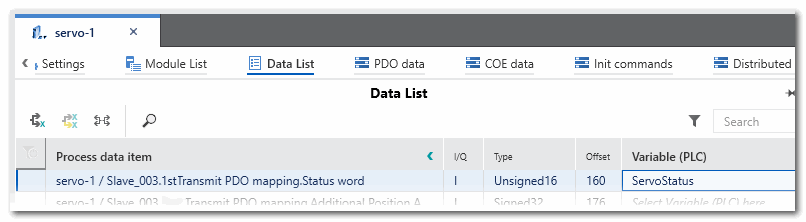
PDOs with a marked 'Active' checkbox are automatically inserted into the 'Data List' of the respective EtherCAT slave. In the Data List, they can be assigned to global IEC variables in your project and further processed in your application.
| Note
If the slave device is an EtherCAT bus coupler, its PDO list contains the process data of the connected I/O modules. |
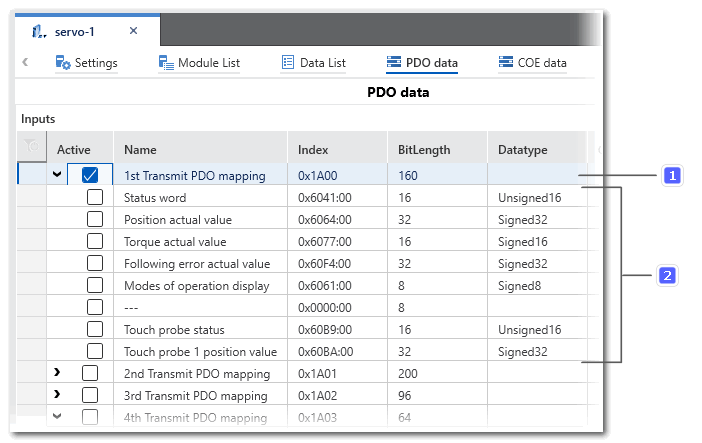
Example: Mapped input PDO of a servo slave device
The '1st Transmit PDO' object with an index of 0x1A00 (no. 1 in the figure) is selected in the grid. It contains the process data items from Status word (0x6041:00) up to Touch probe 1 position value (0x60BA:00) (no. 2).
Due to this selection in the PDO list, the Status word process data item is inserted into the Data List. There, it is assigned to ServoStatus which is a global IEC variable.