SF_TestableSafetySensor
Help version 1.1 / Issue date: 2018.03
The following description is valid for the function block SF_TestableSafetySensor_V3_0z, Version 3.0z (where z = 0 to 9).
|
Short Description
| The safety-related SF_TestableSafetySensor function block evaluates the status of connected optoelectronic safety equipment (e.g., light curtain). The function block additionally has a test function for verifying the connected safety equipment.
Note
The safety equipment is referred to as a safety-related sensor in this documentation. |
Note
The safety-related sensor connected to the function block must meet the requirements of type 2 ESPE (Electro-Sensitive Protective Equipment) as stipulated by IEC 61496-1. This concerns the ability of a safety-related sensor to support a test function. |
Note
Since the safety equipment to be connected belongs to type 2, Cat. 2 is the highest category that can be achieved. |
Note
With a deactivated restart inhibit (S_AutoReset = SAFETRUE), the function block supports an automatic restart after an interruption of the connected optoelectronic safety equipment during sensor test phase 2. |
|
|
Block Icon
| 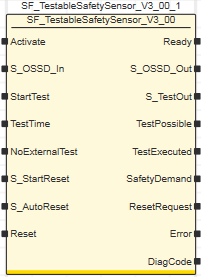 |
|
Inputs
|  Activate Activate
| Short description | Value |
State-controlled input for activating the function block. Data type: BOOL
Initial value: FALSE |
-
FALSE: Function block inactive.
-
TRUE: Function block activated.
|
Refer to the topic "Activate" for details.
S_OSSD_In
| Short description | Value |
State-controlled input for the status of the connected safety-related sensor.Data type: SAFEBOOL
Initial value: SAFEFALSE |
-
SAFEFALSE: The light beam of the safety-related sensor has been interrupted or the safety-related sensor is performing a test.
-
SAFETRUE: The light beam of the safety-related sensor has not been interrupted (normal operation).
|
Refer to the topic "S_OSSD_In" for details.
StartTest
| Short description | Value |
Edge-triggered input for requesting the start of the sensor test.Data type: BOOL
Initial value: FALSE |
-
FALSE: The test of the connected safety-related sensor is not requested.
- Edge FALSE > TRUE: The test of the connected safety-related sensor is requested.
Note
The S_OSSD_Out output remains SAFETRUE while the test is being carried out. |
|
Refer to the topic "StartTest" for details.
TestTime
| Short description | Value |
Input for specifying the maximum response time for the signal changes of the individual test phases between the S_TestOut output and the S_OSSD_In input during the safety-related sensor test.
Data type: TIME
Initial value: #10ms |
Note
The maximum permissible response time is 150 ms. |
Enter a time value according to your risk analysis. |
Non-conformance to safety function requirements
- Verify that the time value set at TestTime corresponds to your risk analysis.
- Be sure that your risk analysis includes an evaluation for incorrectly setting the time value for the TestTime parameter.
- Validate the overall safety-related function with regard to the set TestTime value and thoroughly test the application.
|
Refer to the topic "TestTime" for details.
NoExternalTest
| Short description | Value |
State-controlled input for specifying a required manual sensor test in the event of an error during the automatic sensor test phases. Data type: BOOL
Initial value: FALSE |
-
FALSE: A manual sensor test is required in the event of an error occurring during the sensor test phases performed by the function block.
-
TRUE: No additional manual sensor test is required in the event of an error occurring during the sensor test phases performed by the function block.
|
Refer to the topic "NoExternalTest" for details.
S_StartReset
| Short description | Value |
State-controlled input for specifying the
start-up inhibit after the Safety PLC has been started up or the function block has been activated.An active
start-up inhibit must be removed manually by means of a positive signal edge at the Reset input. A deactivated
start-up inhibit causes the S_OSSD_Out output to switch to SAFETRUE automatically when the function block is activated and the safety-related function is not requested.Data type: SAFEBOOL
Initial value: SAFEFALSE |
-
SAFEFALSE: With
start-up inhibit
-
SAFETRUE: Without
start-up inhibit
|
The start-up inhibit and/or restart inhibit must only be deactivated if it is certain that starting up the machine/system will not lead to a hazardous situation or that a suitable start-up inhibit is in place at another location or using other means.
Non-conformance to safety function requirements
- Verify the impact of a deactivated start-up inhibit (S_StartReset = SAFETRUE) and/or restart inhibit (S_AutoReset = SAFETRUE) on your machine or process prior to implementation.
- Observe the regulations given by relevant sector standards regarding the start-up/restart inhibit.
- Verify that a suitable start-up inhibit is in place at another location or using other means.
|
Refer to the topic "S_StartReset" for details.
S_AutoReset
| Short description | Value |
State-controlled input for specifying the restart inhibit after the SAFETRUE signal has returned at the S_OSSD_In input (i.e., the light beam of the safety-related sensor is no longer interrupted).Data type: SAFEBOOL
Initial value: SAFEFALSEAn active restart inhibit must be removed manually by means of a positive signal edge at the Reset input. A deactivated restart inhibit causes the S_OSSD_Out output to switch to SAFETRUE automatically when the function block is activated and the safety-related function is no longer requested. |
-
SAFEFALSE: With restart inhibit
-
SAFETRUE: Without restart inhibit
|
The start-up inhibit and/or restart inhibit must only be deactivated if it is certain that starting up the machine/system will not lead to a hazardous situation or that a suitable start-up inhibit is in place at another location or using other means.
Non-conformance to safety function requirements
- Be sure that your risk analysis includes an evaluation if the restart inhibit is deactivated (S_AutoReset = SAFETRUE).
- Observe the regulations given by relevant sector standards regarding the restart inhibit.
- Verify that a suitable start-up inhibit is in place at another location or using other means if the restart inhibit is deactivated by setting S_AutoReset = SAFETRUE.
|
Refer to the topic "S_AutoReset" for details.
Reset
| Short description | Value |
Edge-triggered input for the reset signal:
- Resetting error messages when the cause of the error is no longer present.
- Manual resetting of an active start-up/restart inhibit (depending on which type(s) of inhibit the function block provides).
Data type: BOOL
Initial value: FALSE |
-
FALSE: Reset is not requested
- Edge FALSE > TRUE: Reset is requested
|
Note
Resetting does not occur with a negative (falling) edge, as specified by standard EN ISO 13849-1, but with a positive (rising) edge.
To implement the reset with a falling edge (with regard to the mandatory acceptance procedure), use the function block SF_Reset. |
Resetting the function block by means of a positive signal edge at the Reset input can cause the S_OSSD_Out output to switch to SAFETRUE immediately (depending on the status of the other inputs).
Unintended start-up
- Include in your risk analysis the impact of the reset by means of a positive signal edge at the Reset input.
- Make certain that appropriate procedures and measures (according to applicable sector standards) have been established to help avoid hazardous situations when resetting.
- Do not enter the zone of operation when resetting.
- Ensure that no other persons can access the zone of operation when resetting.
- Use appropriate safety interlocks where personnel and/or equipment hazards exist.
|
Refer to the topic "Reset" for details.
|
|
Outputs
| Ready
| Short description | Value |
| Output for signaling "Function block activated/not activated".Data type: BOOL |
-
FALSE: Function block is not activated (Activate = FALSE) and all outputs of the function block are switched to FALSE/SAFEFALSE.
-
TRUE: Function block is activated (Activate = TRUE) and the output parameters represent the state of the safety-related function.
|
Refer to the topic "Ready" for details.
S_OSSD_Out
| Short description | Value |
| Output for enable signal of the function block. Data type: SAFEBOOL |
-
SAFEFALSE:
- Light beam of the safety-related sensor is interrupted
-
or the function block is not activated
-
or the start-up/restart inhibit is active
-
or an error message is present.
-
SAFETRUE:
- Light beam of the safety-related sensor is not interrupted
-
and the function block is activated
-
and the start-up/restart inhibit is not active
-
and no error message is present.
|
Refer to the topic "S_OSSD_Out" for details.
S_TestOut
| Short description | Value |
| Output for the signal for controlling the test input of the type 2 safety-related sensor connected.Data type: SAFEBOOL |
-
SAFEFALSE: Phase 1 of sensor test active.
-
SAFETRUE: Sensor test not active
or
phase 2 of sensor test
|
Refer to the topic "S_TestOut" for details.
TestPossible
| Short description | Value |
| Output for the signaling whether an automatic sensor test is possible.Data type: BOOL |
-
TRUE: Automatic sensor test is possible and can be requested by a positive edge at the StartTest input.
-
FALSE: Automatic sensor test is not possible. A positive edge at the StartTest input has no effect.
|
Refer to the topic "TestPossible" for details.
TestExecuted
| Short description | Value |
| Output for signaling the status of the sensor test.Data type: BOOL
Note
The enable signal at the S_OSSD_Out output can be SAFETRUE even if there is no TRUE signal at TestExecuted.
The automatic test has to be performed with positive results for the safety-related sensor to function correctly. |
|
-
TRUE: The automatic sensor test has been performed successfully.
-
FALSE: The automatic sensor test
- has not yet been performed.
-
or is currently in progress
-
or has been carried out with errors.
|
Refer to the topic "TestExecuted" for details.
SafetyDemand
| Short description | Value |
Output for signaling "safety-related function requested".
This output displays whether the safety chain is interrupted and as a result, the attention of the operator is required. Data type: BOOL |
-
FALSE: Safety-related function is not requested.
-
TRUE: The safety-related function is requested.
|
Refer to the topic "SafetyDemand" for details.
ResetRequest
| Short description | Value |
Output for signaling "reset is required".
This output indicates whether a reset by the operator is required. Data type: BOOL |
-
FALSE: No reset required.
-
TRUE: A reset is required:
- to remove an active start-up or restart inhibit (if available for this function block)
-
or to reset an error.
|
Refer to the topic "ResetRequest" for details.
Error
| Short description | Value |
| Output for error message.Data type: BOOL |
-
FALSE: No error is present.
-
TRUE: The function block has detected an error. The S_OSSD_Out output switches to SAFEFALSE as a result.
Note
The S_TestOut output also remains SAFETRUE during an error message. |
|
Refer to the topic "Error" for details.
DiagCode
| Short description | Value |
| Output for diagnostic message.Data type: WORD | Diagnostic message of the function block.
The possible values are listed and described in the topic "Diagnostic codes". |
Refer to the topic "DiagCode" for details.
|
| Detailed information | Signal sequence diagram
This diagram is based on a typical method of connecting the safety-related SF_TestableSafetySensor function block. The following assumptions apply:
-
S_StartReset = SAFEFALSE: Start-up inhibit after the function block has been activated and the Safety PLC has started up.
-
S_AutoReset = SAFEFALSE: Restart inhibit if the safety light beam of the sensor is no longer interrupted (SAFETRUE signal returns at the S_OSSD_In input).
-
NoExternalTest = TRUE: No additional manual sensor test is required in the event of an error occurring during the sensor test phases performed by the function block.
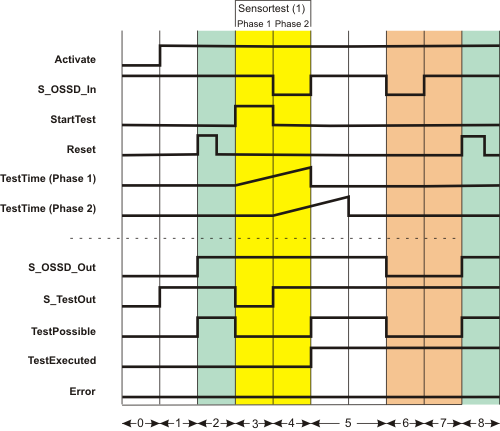
| (1) | Sensor test with two test phases: Phase 1 and phase 2 |
| 0 | The function block is not yet activated (Activate = FALSE). As a result, all outputs are FALSE or SAFEFALSE. |
| 1 | The function block is activated (Activate = TRUE).
Even though at the time of function block activation, the S_OSSD_In input (status of the connected sensor) is SAFETRUE, the S_OSSD_Out output remains SAFEFALSE, as a start-up inhibit (S_StartReset = SAFEFALSE) is specified.
As there is no active sensor test, the S_TestOut output switches to SAFETRUE immediately.
The TestPossible output remains FALSE as the active start-up inhibit means sensor tests are not possible. |
| 2 | The start-up inhibit is removed by a positive edge at the Reset input.
Since input S_OSSD_In = SAFETRUE (the light beam of the connected sensor is not interrupted), the S_OSSD_Out output switches to SAFETRUE: The sensor does not request a safety-related function (e.g., shutdown).It also becomes possible to perform sensor tests when the start-up inhibit is removed (TestPossible output becomes TRUE). |
| 3 | The sensor test starts with sensor test phase 1 when there is a positive edge at the StartTest input. The S_OSSD_Out output remains SAFETRUE during the sensor test to avoid interrupting operation.The S_TestOut output becomes SAFEFALSE to start the test for the connected sensor. The TestPossible output is FALSE during the active test, as two sensor tests cannot be performed at the same time. |
| 4 | The connected sensor reports the SAFEFALSE state at the S_OSSD_In input within the set monitoring time TestTime. This is in line with correct behavior. As a result, the S_OSSD_Out output remains SAFETRUE and no error message is output (the Error output remains FALSE).The switch from SAFETRUE to SAFEFALSE at the S_OSSD_In input starts the second monitoring timer TestTime (2).
Phase 2 of the sensor test is now active, which means that the S_TestOut output switches back to SAFETRUE.As before, the enable output is SAFETRUE (normal operation). |
| 5 | The connected sensor reports the SAFETRUE state again at the S_OSSD_In input within the set monitoring time TestTime. This is in line with correct behavior. The function test has now been successfully completed, which means that the sensor is functioning correctly. The TestExecuted output is switched to TRUE as a result.
The S_OSSD_Out output also remains SAFETRUE, as the light beam of the sensor is not interrupted (no shutdown required). |
| 6 | The light beam of the sensor is interrupted, the S_OSSD_In input becomes SAFEFALSE. The S_OSSD_Out output immediately switches to SAFEFALSE.This also causes the TestPossible output to become FALSE, as sensor tests are not permitted under these circumstances. |
| 7 | Although the safety-related function request is reset once more (the S_OSSD_In input is SAFETRUE again), the S_OSSD_Out enable output and TestPossible output remain FALSE, as the restart inhibit has been specified at S_AutoReset = SAFEFALSE. |
| 8 | Pressing the connected reset button creates a positive edge at the Reset input. This removes the restart inhibit. Since the connected light beam of the sensor is not interrupted (S_OSSD_In = SAFETRUE), the S_OSSD_Out output switches to SAFETRUE. The TestPossible output also becomes TRUE, thereby signaling that a new sensor test can be requested. |
Application example
The following figure shows how a light curtain is connected to the safety-related SF_TestableSafetySensor function block using a single-channel arrangement.
The test signal (start/stop of the sensor test) is output to the sensor at output 1.1 of the safety-related output device PSDO. The status signal of the sensor is connected to input 1.1 of the safety-related input device PSDI 1.
Note
The enable output S_OSSD_Out of the SF_TestableSafetySensor function block is directly connected to a global I/O variable or to an output terminal of the application via additional safety-related functions/function blocks.
The function block output TestPossible signals whether a test is possible and the TestExecuted output indicates whether the test was performed successfully or is currently in progress. Both outputs are connected to standard variables and can thus be processed in the higher-level standard controller.
SafetyDemand signals the status "safety function requested". Connect the SafetyDemand output to an output terminal of your application, either directly or via other standard functions/function blocks.
ResetRequest signals whether a reset request by the operator is required to continue. Connect the ResetRequest output to a signal lamp, for example. |
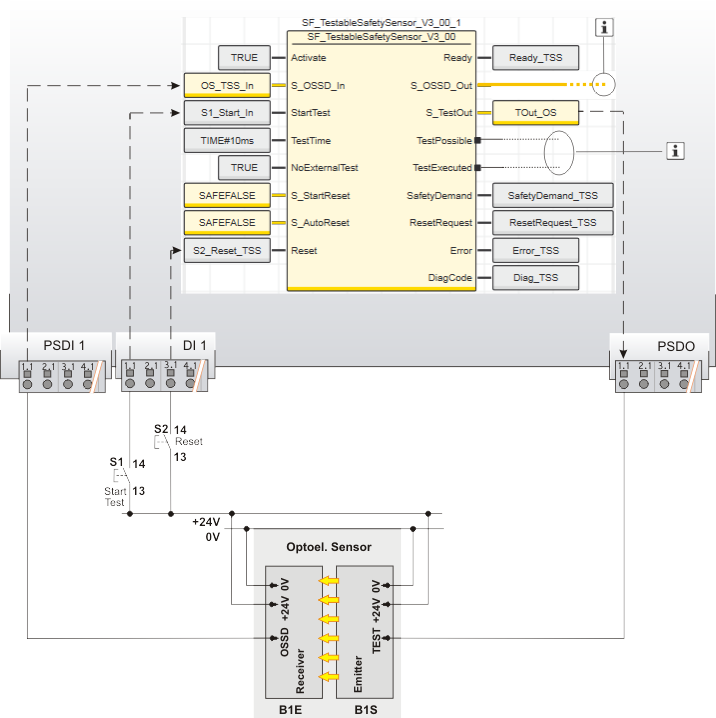
| S1 | Start test |
| S2 | Reset |
| B1 | ESPE - optoelectronic sensor |
| B1S | Emitter |
| B1E | Receiver |
 | See note above the illustration. |
Function block instantiation
The IEC 61131-3 standard defines function block instantiation. Instantiation means, a function block is defined once and can be used (instantiated) several times. This applies to all standard and safety-related FBs (local POUs as well as firmware and user library FBs).
Why instantiation?
A function block has an internal memory where it stores its own processing data (local variables). As a consequence, the output values calculated by the FB depend on the internally stored values. The same input values applied to an FB instance do not necessarily deliver the same results in another FB instance.
Therefore, it is necessary to store the internal data of the FB to a separated memory area each time the function block is processed, i.e., for each FB instance. To uniquely identify each FB instance and to clearly separate its memory area, instance names are used. The instance name of a function block has to be declared in the 'Variables' table of the POU where the FB is going to be used.
The following applies:
- Function blocks can be instantiated in other function blocks or in program POUs. Calling FBs in function POUs is not possible.
- Functions are called without instantiation because they do not have an internal memory.
Example for the instantiation of a safety-related PLCopen function block
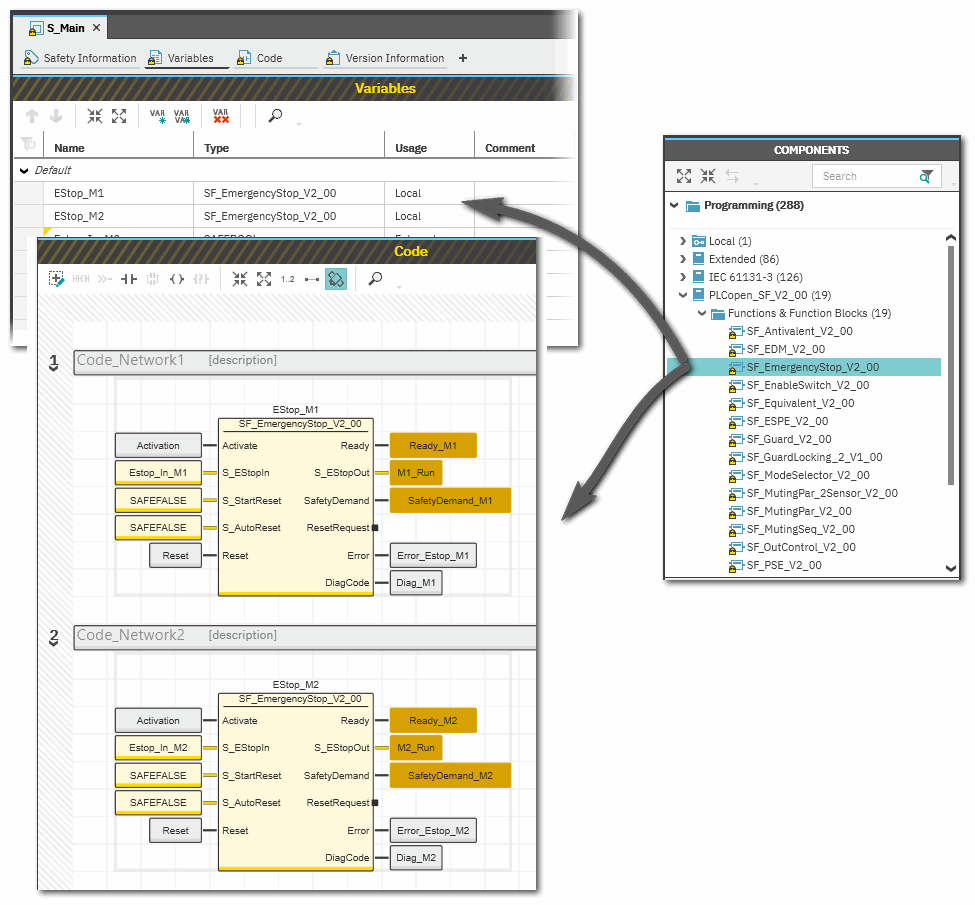
The safety-related PLCopen function block 'SF_EmergencyStop_V2_00' was inserted into the project via a library. It is then available in the 'Programming' category of the COMPONENTS area. There is a folder with the same name as the library that provides the FBs for insertion into the safety-related code.
The FB is to be called twice in the code of the safety-related program 'S_Main' to evaluate the status of two safety-related emergency stop command devices. For each FB instance, an instance name is declared in the 'Variables' table of the calling program: EStop_M1 and EStop_M2. The FB instances have been inserted into the code worksheet, each instance with different variables connected to its input and output formal parameters.
Additional information is available in the following sections:
|